OpenZhenZhen AI 提示词画廊 · Claude Opus 5.5 · video
Blender关节台灯动画
Blender Articulated Desk Lamp Animation
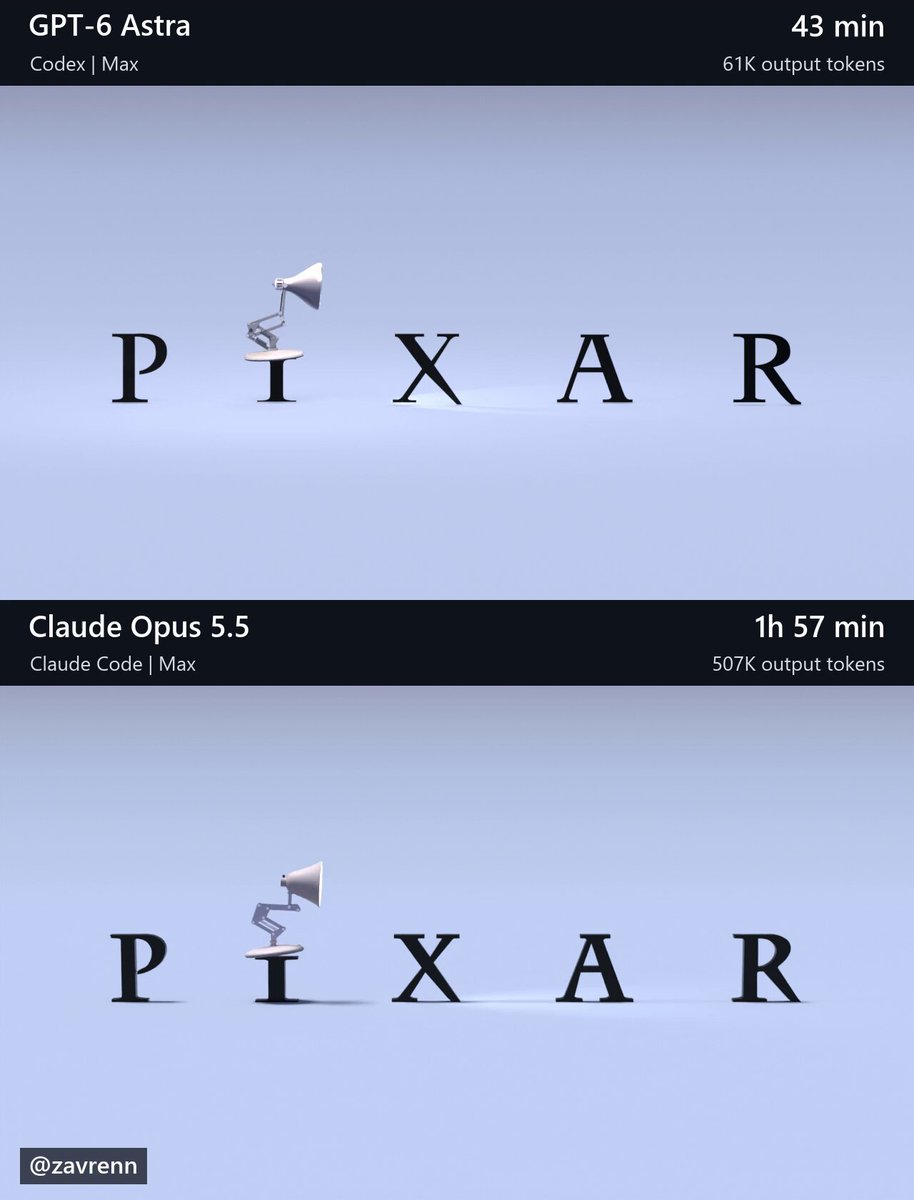
创作者用同一份详细提示词和参考图,让GPT-6 Astra和Claude Opus 5.5分别在Blender中还原一段台灯动画,Opus耗时更长、消耗的token也远多于Astra。 原作需要参考素材;请自行准备图片、视频、音频、文档或代码库等输入。
提示词 / Prompt
English prompt
Create a finished, editable Blender recreation of the six-second animation shown in this workspace’s reference/t\_\*.png images. Open and inspect the reference images before building. Their filenames give seconds from the start of the animation: t\_1.20s.png means 1.20 seconds. Use these images as the visual reference and leave them unchanged. Match the complete composition: the lamp’s proportions and articulated structure, lettering, interactions, camera framing, materials, lighting, shadows, and final fade. Pay particular attention to jump timing, preparation, landings, settling, and head turns. Preserve the reference’s stylized motion and create coherent movement between the sampled poses. Make reasonable choices for unseen details. Build genuine 3D geometry and animation that remain editable. Keep joints connected and contact believable. Do not substitute reference images or footage for geometry, textures, backgrounds, or rendered output. Create the assets yourself using installed tools; do not download assets, browse the web, or use other AI agents or models. Blender is installed at: C:\Program Files\Blender Foundation\Blender 5.2\blender.exe Prepare the final scene at 1280×720, 30 fps, frames 1–180, with frame 1 representing time zero. Use Cycles, 64 samples, and denoising. Preserve the reference lettering; add no extra titles, watermarks, interface, comparison layout, or audio. Render and visually inspect low-resolution previews across the action, including between reference timestamps. Correct visible problems and recheck affected frames. We will render the final video separately. Save scene.blend with the final render settings and a build\_scene.py that rebuilds it from scratch. The saved scene must render without external asset dependencies. Verify that it opens and renders in background mode. Work autonomously through completion, making routine decisions yourself. Finish with a brief report of the saved files, checks actually performed, and remaining limitations.
主题与风格
探索更多图片和视频提示词 · 生成图片 · 生成视频 · 在 AI 画布中创作
相关作品
- 哈士奇111
subject_definitions: <Subject 1> 是本片唯一的宠物主角 — FACE from <Picture 1>(哈士奇雪橇犬,冰蓝色眼睛,黑色鼻头,黑白双色、头顶黑色面罩纹、灰黑鞍部、白脸白胸白四肢,蓬松双层毛、体态骨架匀称结实,气质活泼)。只参考 <Picture 1> 的外观(五官、毛色、花纹、体型),不使用 <Picture 1> 的背景、场景与构图;视频全程保持与 <Picture 1> 外观完全一致。 summary: [reference generation] 0-5s 静谧微距张力;5-9s 爪部微距切全景;9-15s 摇臂升空+逆光剪影谢幕。主角全程
- 哈士奇
subject_definitions: <Subject 1> 是本片唯一的宠物主角 — FACE from <Picture 1>(哈士奇雪橇犬,冰蓝色眼睛,黑色鼻头,黑白双色、头顶黑色面罩纹、灰黑鞍部、白脸白胸白四肢,蓬松双层毛、体态骨架匀称结实,气质活泼)。只参考 <Picture 1> 的外观(五官、毛色、花纹、体型),不使用 <Picture 1> 的背景、场景与构图;视频全程保持与 <Picture 1> 外观完全一致。 summary: [reference generation] 0-4s 鼻头超微距视觉钩子;4-9s 变速极速拉出+3D环绕;9-15s 0.4x呼吸感定格
- 西格玛男人修仙
用了吃猪侠那个跑30秒的工作流 所以可以跑20秒视频
- 女孩真人感测试
**【参考图像锚定】** 图像 1 是 [年轻女性],保留参考图中的面部特征、精致妆容、浅金色长直发与空气刘海、简约白色上衣、脖颈细金链与小巧金坠吊坠,及整体外貌。人物仅锚人物本身,场景按下文文字重建,不得沿用图内任何构图或背景细节。 **【分镜】** **人物初始站位与空间关系**:夜晚路灯下,她站在街边一盏路灯正下方偏前的位置,手持手机以真实前置摄像头自拍视角拍摄,画面从胸以上的中近景开始,镜头随她的手持动作运动。头顶路灯洒下柔和的暖白光池,从上方偏正前照亮她的脸 —— 额头、鼻梁、颧骨受光,鼻下与眼窝投下朝下的柔影;浅金发顶和颊边碎发被灯光勾出一圈暖色轮廓光,发丝末梢泛一点暖亮的金;
- H3单采,7秒打斗测试
integrated_multimodal_description: (本段为极度硬核的高速CG兵器交锋。禁用2D动漫渲染。画面中只有加雷斯和洛恩两人。加雷斯在连续攻击中开口嘲讽,洛恩全程嘴唇紧闭死扛。) [Shot1] 0-2.5s, Unreal Engine 5 render, hyper-realistic, fast-paced sword fight, dynamic camera tracking. A muscular man in heavy red-black iron armor (Gareth) swings a massive greatsword downward
- H3爆裂冲击帧之【闪电箭】
输入邀请码:rh-v1631 领1000RH币,每天登录还有100币 H3满血无损!正面对标SD2.0 全网最干净方便的空间折叠工作流,去除繁复连线、虚空桥接+空间折叠; B站主页:https://space.bilibili.com/111985620/lists?sid=7895659&spm_id_from=333.788.0.0 youtube主页:https://www.youtube.com/@%E5%90%83%E7%8C%AA%E4%BE%A0233